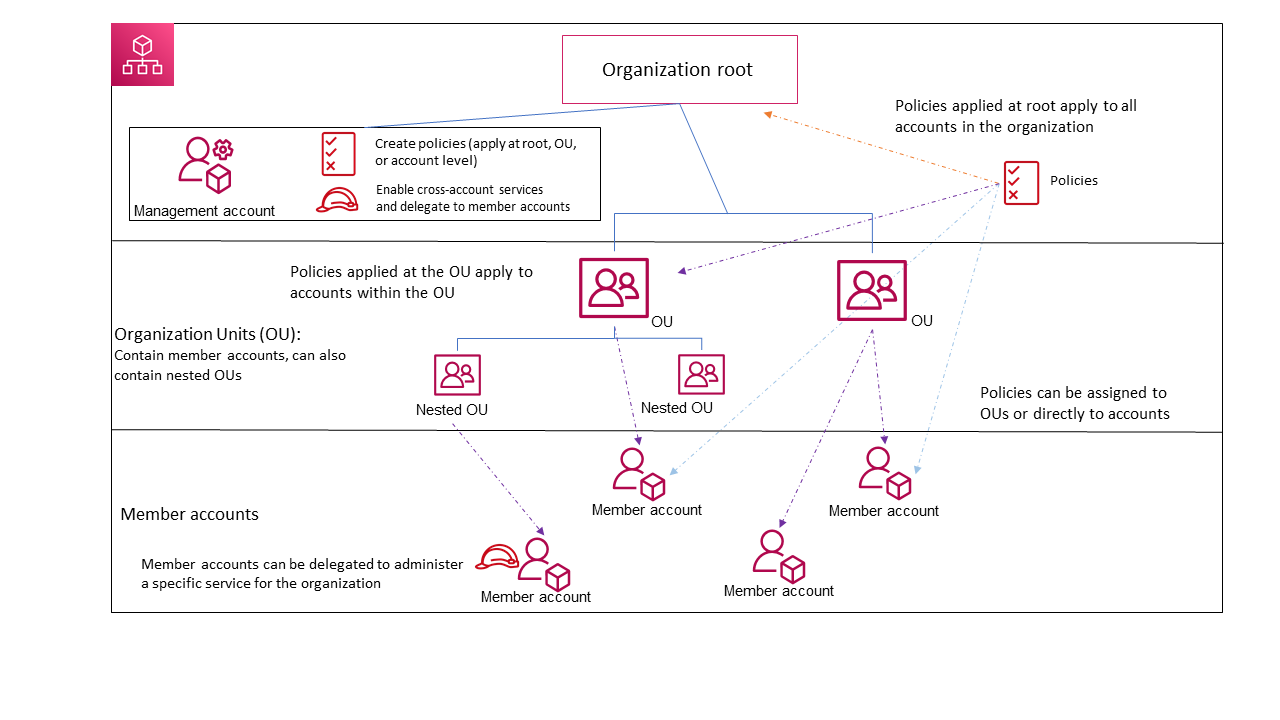
centrally declare and enforce your desired configuration for a given AWS service at scale across an organization
prevent noncompliant actions. For example:
block public internet access to Amazon VPC resources across your organization
control the discovery and use of AMI
controls if Amazon EBS snapshots are publicly accessible
Backup Policies:
centrally manage and apply backup plans to the AWS resources across an organization’s accounts
gives granular control over backing up your resources at whatever level your organization requires
Tag Policies:
standardize the tags attached to the AWS resources in an organization’s accounts
can specify that noncompliant tagging operations on specified resource types are enforced. In other words, noncompliant tagging requests on specified resource types are prevented from completing.
Untagged resources or tags that aren’t defined in the tag policy aren’t evaluated for compliance with the tag policy.
Chatbot Policies:
control access to your organization’s accounts from chat applications such as Slack and Microsoft Teams
AI services opt-out policies:
control data collection for AWS AI services for all the accounts in an organization.
Trusted Access:
enable a supported AWS service that you specify, called the trusted service, to perform tasks in your organization and its accounts on your behalf.
allows the trusted service to create a service-linked role in every account in your organization whenever that role is needed
allow customers to programmatically modify their account information and metadata using their organization
if enabled, can enable/disable region
AWS Billing and Cost Management
can create a budget for the whole organization or per account.
Cost Explorer can be filtered by account in an organization (cannot filter by OU)
RI and Saving Plan Sharing:
activated/deactivated from Billing Preference
AWSControl Tower
Concepts and Terminologies:
Landing zone: A landing zone is a cloud environment that offers a recommended starting point, including default accounts, account structure, network and security layouts, and so forth. From a landing zone, you can deploy workloads that utilize your solutions and applications.
Control: A control (also known as a guardrail) is a high-level rule that provides ongoing governance for your overall AWS Control Tower environment. Each control enforces a single rule. Preventive controls are implemented with SCPs. Detective controls are implemented with AWS Config rules. Proactive controls are implemented with AWS CloudFormation hooks
Member account: A member account belongs to the AWS Control Tower organization. The member account can be enrolled or unenrolled in AWS Control Tower
Controls:
Mandatory:
owned by AWS Control Tower
applied to every OU on your landing zone.
applied by default when you set up your landing zone
can’t be deactivated.
Proactive:
check resources before they deployed
determine whether the new resources will comply with the controls that are activated in your environment.
scans your resources before they are provisioned, and makes sure that the resources are compliant with that control.
resources that are not compliant will not be provisioned.
implemented by means of AWS CloudFormation hooks and they apply to resources that would be provisioned by AWS CloudFormation. As a consequence, these controls may not affect requests that are made directly to services through some other means.
status of a proactive control is PASS, FAIL, or SKIP.
Preventive:
ensures that your accounts maintain compliance
disallows actions that lead to policy violations.
status of a preventive control is either enforced or not enabled.
supported in all AWS Regions.
implemented using service control policies (SCPs), or resource control policies (RCPs), each of which are part of AWS Organizations.
Detective:
detects noncompliance of resources within your accounts, such as policy violations, and provides alerts through the dashboard.
status of a detective control is either clear, in violation, or not enabled.
implemented using AWS Config rules.
apply only in those AWS Regions supported by AWS Control Tower.