Establish a dedicated connection from an on-premises network to one or more VPCs.
Uses industry-standard 802.1Q VLANs to connect to Amazon VPC using private IP addresses. The VLANs are configured using virtual interfaces (VIFs)
Three (3) Types of VIFs:
Public virtual interface – Establish connectivity between AWS public endpoints and your data center, office, or colocation environment.
Private virtual interface – Establish private connectivity between Amazon VPC resources and your data center, office, or colocation environment. The use of private VIFs is shown in the following figure.
Transit virtual interface – Establish private connectivity between AWS Transit Gateway and your data center, office, or colocation environment.
Can access any AWS Region from any of Direct Connect locations (except China).
Two (2) types of connection:
Dedicated connections
A physical ethernet connection is associated with a single customer.
You can order port speeds of 1, 10, or 100 Gbps.
You can use a link aggregation group (LAG) to aggregate multiple connections at a single AWS Direct Connect endpoint
Hosted connections
A physical ethernet connection is provisioned by an AWS Direct Connect Partner and shared with you.
You can order port speeds between 50 Mbps and 10 Gbps.
Capacity on demand.
Gateways:
Direct Connect Gateway:
Connects to:
Right Side:
Direct Connect Router in a Region
Left Side:
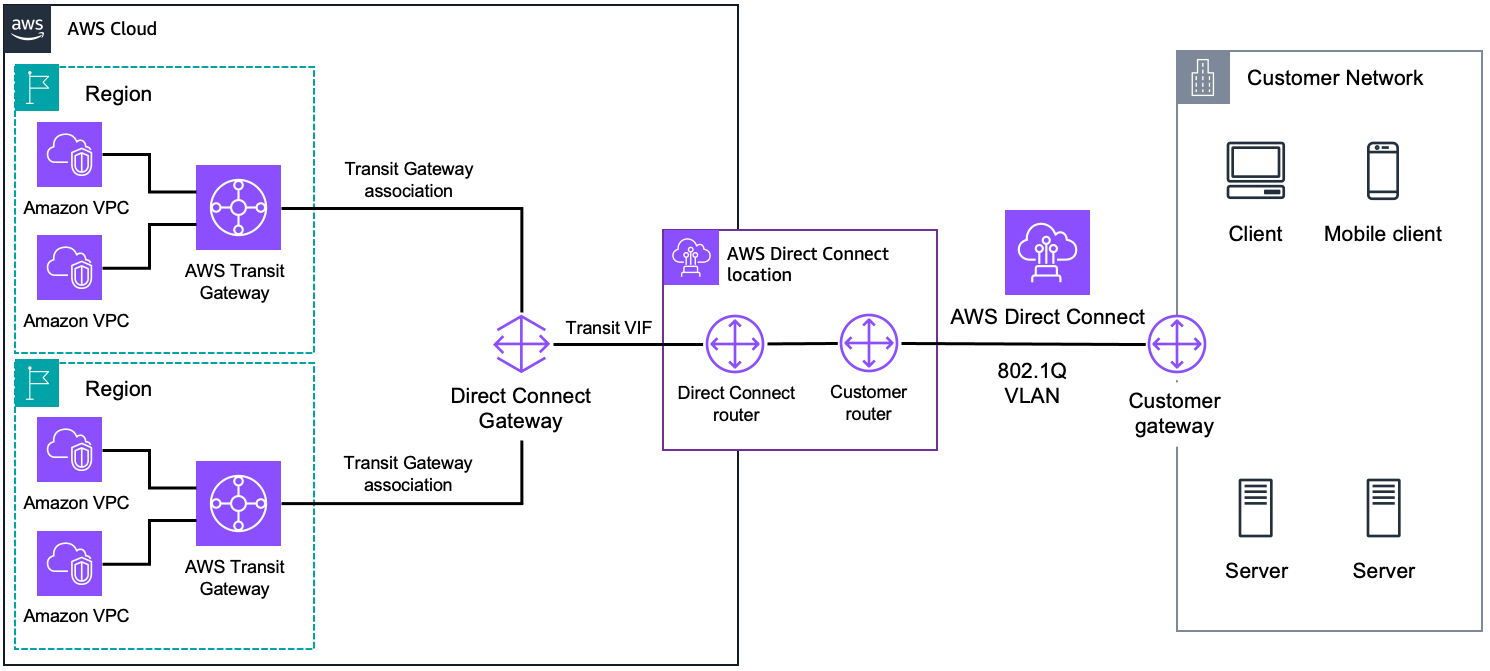
Transit Gateway (multiple VPCs in the same Region) via Transit VIF [ DC Router -> Transit VIF -> DC GW -> TGW ]
Virtual Private Gateway (multiple VPCs in different Regions) via Private VIF [ DC Router -> Private VIF -> DC GW -> VP GW ]
AWS Cloud WAN core network
Transit Gateway:
Connects to multiple VPCs in the same region.
Connects to:
Right Side:
Direct Connect Gateway
S2S VPN (Public VIF)
Left Side:
VPC via DC GW (same Region) [ DC Router -> Transit VIF -> DC GW -> TGW -> VPC ]
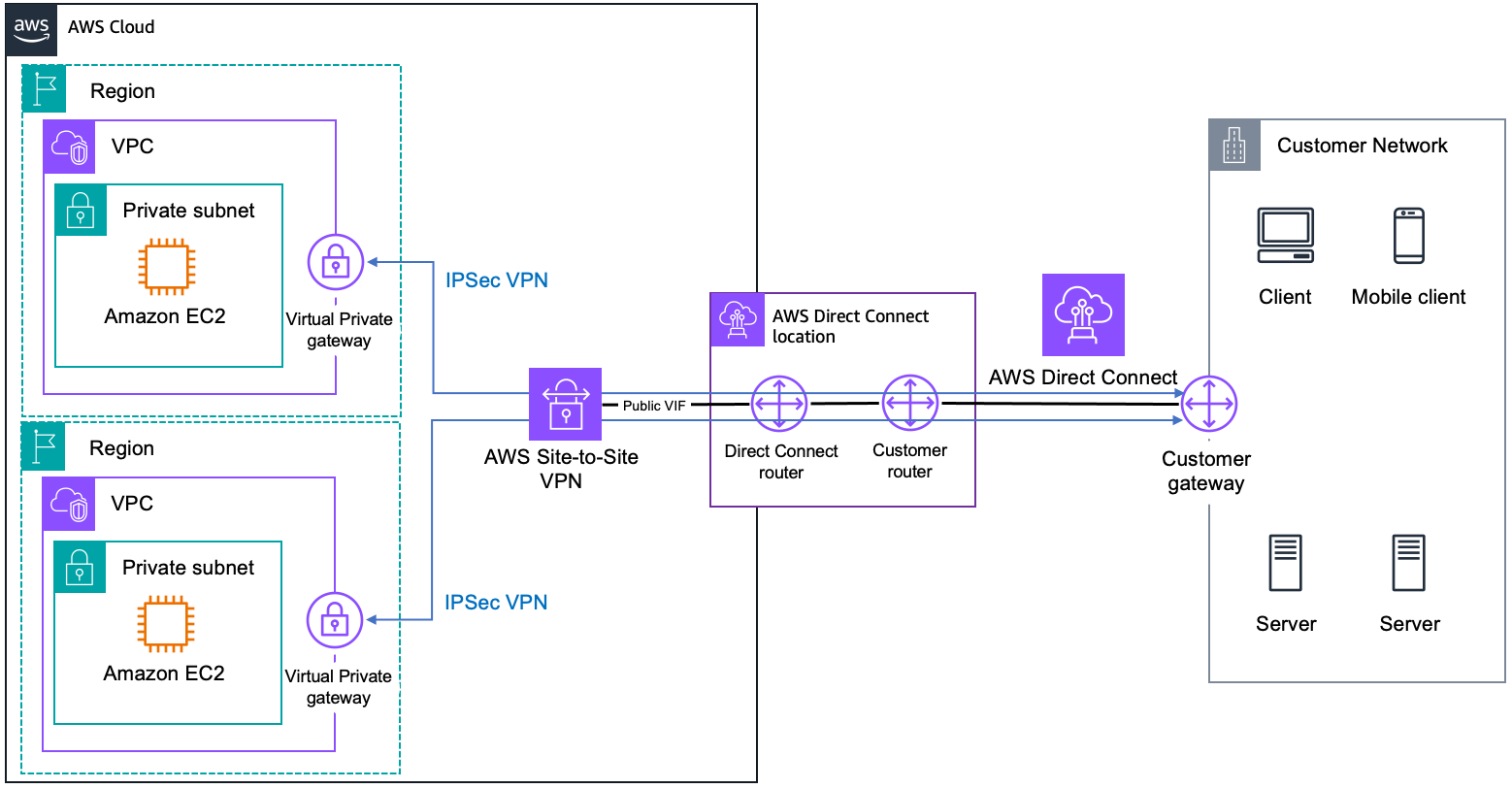
VPC via S2S VPN (same Region) [ DC Router -> Public VIF -> S2S VPN -> TGW -> VPC ]
Virtual Private Gateway:
Connects to only 1 VPC
Connects to:
Right Side:
Direct Connect Gateway (Private/Public VIF)
S2S VPN (Public VIF)
Left Side:
VPC via DC GW (multiple regions) [ DC Router -> Private VIF -> DC GW -> VP GW -> VPC ]
VPC via S2S VPN (multiple regions) [ DC Router -> Public VIF -> S2S VPN -> VP GW -> VPC ]
Architecture
Basic Architecture:
Private VIF is used for connecting to a specific VPC within a single region
AWS Direct Connect + AWS Transit Gateway
Requires a Transit VIF, which connects to a Direct Connect Gateway
Direct Connect Gateway connects to the Transit Gateway via Transit Gateway Association.
It can be used to connect to multiple regions.
Use Transit VIF when you want to connect multiple VPCs across different AWS Regions and on-premises networks through a single Direct Connect connection
AWS Direct Connect + AWS Site-to-Site VPN
It requires a Public VIF to connect to an S2S VPN.